
Published by Wayback Downloader.
Fix broken links in a downloaded Wayback website by classifying each reference, resolving it against the correct original page address, and mapping known destinations to actual files in the recovered package. Work on a copy, preserve different paths and resource versions, and test the rewritten references through the intended hosting arrangement. A global replacement of an archive hostname is not a safe substitute for that mapping.
Prefer to skip the manual work? We can Wayback Machine to HTML download with archive code removed and links fixed. You can also request a free check of what the archive saved first.
The goal is narrower than collecting the website: make the references in an already acquired package point to the agreed pages and assets without damaging intentional external links or inventing missing files.

Build a reference inventory before changing HTML
Collect page links, image and stylesheet references, script sources, document links and fragment targets. Record the containing page as well as the attribute or stylesheet rule that uses the reference. The same relative string can resolve differently in two directories.
Separate internal page destinations from external websites, assets and non-navigation references such as mailto:, tel: or a section fragment. Review form actions and script-generated requests independently; they can invoke services rather than open ordinary pages.
Keep the untouched retrieval and its source manifest. Back up the working copy before a transformation, and keep a small change log that identifies the files and decisions affected. Do not remove copyright, licensing or attribution notices as part of archive cleanup.
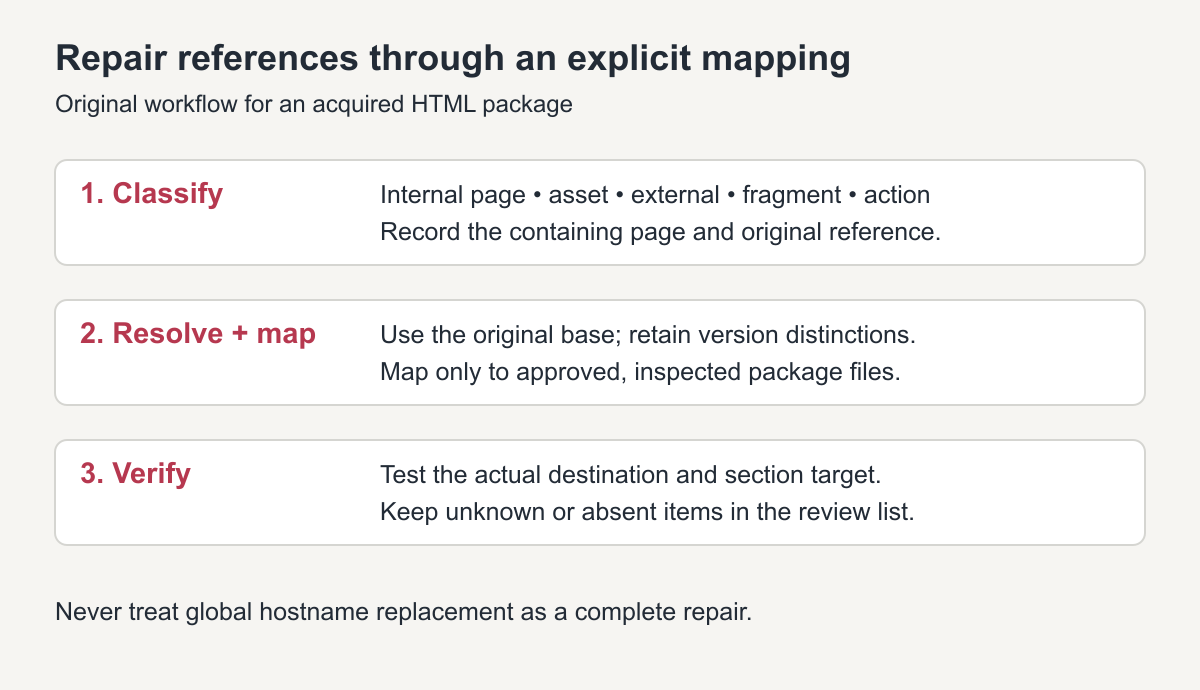
Original cleanup workflow. Unknown or absent destinations need investigation, not an invented replacement path.
Distinguish archive replay from the original destination
A replay address can contain an archive host, a capture timestamp and the original URL. That wrapper describes where a capture was displayed; it is not the local destination you necessarily want after restoration.
Inspect the recorded capture and identify the intended original resource. Retain the source reference in your manifest, then map the original address to a real package file. Replay URL formats and modifiers vary, so do not assume that one regular expression handles every archived script, asset or query string.
The following table contains demonstration addresses and an invented timestamp. It shows proposed mappings, not actual recovered files or before-and-after client results.
| Demonstration input | Original item or meaning | Proposed action |
|---|---|---|
https://web.archive.org/web/20200102030405/https://example.com/about.html |
Selected replay of /about.html |
Use /about.html only if that package file exists |
../../assets/logo.png within /guides/install/ |
/assets/logo.png on the original site |
Map to the inspected logo destination |
/downloads/spec.pdf?rev=1 |
A particular document reference | Keep the version distinction in the manifest |
#dimensions |
Section target in the current page | Preserve it and verify the target ID |
https://partner.example/contact/ |
Intentional external destination | Retain it if current and approved |
mailto:[email protected] |
Email action | Owner approves the current recipient; do not rewrite as a file path |
If an archive wrapper has no corresponding collected destination, preserve the evidence record and mark the delivery link unresolved. Replacing it with a plausible filename does not make the missing page exist.
Resolve nested relative paths against the right base
Use a URL parser rather than concatenating strings. MDN's URL constructor documentation explains how a relative reference resolves against a base. The original page address is the relevant base for understanding the source; the deployed address is relevant after the transformation.
Also inspect any document <base> element. MDN's base-element reference explains its effect on relative URLs. A retained historical base can redirect references away from the reconstructed destination even when they look local in the HTML.
Do not flatten every page into one folder unless the approved output deliberately changes the URL scheme. Preserve .html, .htm, directory-style paths and case-sensitive names according to the source-to-destination manifest and target host behavior. Two different resource URLs should not collide merely because their last filenames match.
A tested, deliberately limited mapping example
This JavaScript example demonstrates known-original URL mapping only. It was checked with synthetic inputs, not a customer site. It does not unwrap archive URLs, parse HTML, edit files, retrieve resources or sanitize untrusted code. Supply original references after inspecting any replay wrapper.
const targets = new Map([
  ["https://example.com/about.html", "/about.html"],
  ["https://example.com/assets/logo.png", "/assets/logo.png"],
  ["https://example.com/download.pdf?rev=1", "/downloads/catalogue-v1.pdf"]
]);

function mapReference(reference, originalPageUrl) {
  if (/^(#|mailto:|tel:)/i.test(reference)) return reference;
  let source;
  try { source = new URL(reference, originalPageUrl); }
  catch { return reference; }
  if (!["http:", "https:"].includes(source.protocol)) return reference;
  const fragment = source.hash;
  source.hash = "";
  const target = targets.get(source.href);
  return target ? target + fragment : reference;
}
With the illustrative base https://example.com/guides/install/, the checked cases were:
| Input | Returned reference |
|---|---|
../../about.html#team |
/about.html#team |
../../assets/logo.png |
/assets/logo.png |
/download.pdf?rev=1 |
/downloads/catalogue-v1.pdf |
/download.pdf?rev=2 |
Unchanged: no approved mapping |
https://partner.example/contact/ |
Unchanged: intentional external URL |
#dimensions |
Unchanged: local fragment |
mailto:[email protected] |
Unchanged: email action |
An unchanged value is not a validation pass. Unknown and malformed references still belong in the review list. An HTML-aware implementation must also handle the actual attributes and stylesheet URLs involved; this small function is not a complete cleanup tool.
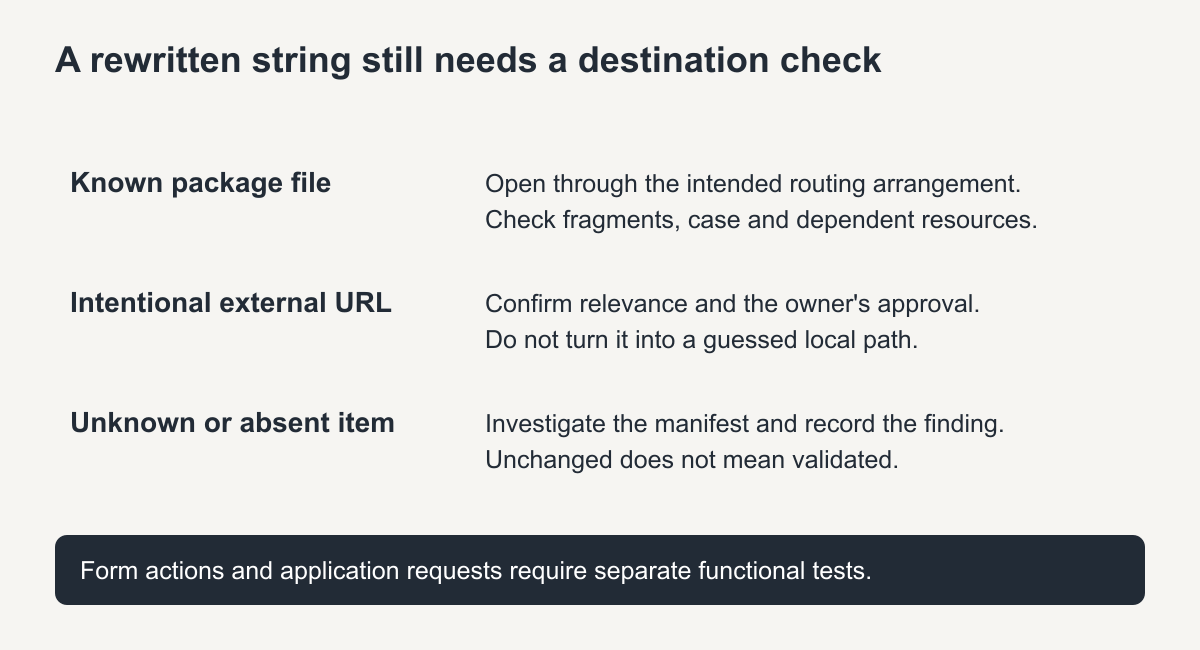
Original verification guide. A string transformation and a working destination are separate checks.
Test destinations, fragments and application behavior
Serve the cleaned package through a local HTTP preview or private staging destination. Open included pages directly and follow important references from nested pages, not just the homepage. Confirm that fragments identify real sections, documents open correctly and the intended CSS and script files load.
Review each unresolved request against the manifest. Distinguish a missing file from a routing mismatch, capitalization problem or intentionally external resource. Fix the specific cause and repeat the relevant checks.
Forms and script requests need a separate functional scope. A new destination in a form action is not proof that validation, notifications or checkout now work. Remove or replace obsolete behavior only with an approved decision, and test new implementations independently.
The HTML package guide explains the broader collection and delivery process. A scoped HTML restoration service can address mapping and cleanup when those tasks are included. Ask for the verified manifest and unresolved list, not merely a claim that archive strings were removed.
Downloaded Wayback website link checklist
- No links still start with web.archive.org.
- Every internal link opens a file that exists.
- Images, CSS and scripts load offline.
- External links point to the live sites, not archive copies.
Frequently asked questions
Why does my downloaded Wayback website link back to the archive?
The archive rewrites links to its own address when it serves a page, and downloaders often save those rewritten links.
Can I fix all links with one search and replace?
Partly. Simple patterns can be replaced in bulk, but relative paths and file names still need checking.
How do I test links offline?
Open the site from your computer with the internet turned off; anything still loading from the archive will fail.