
Published by Wayback Downloader.
Recovering a PDF from the Wayback Machine requires finding its original document URL and obtaining a usable copy of the actual file. An archived page containing a download link does not establish that the linked binary survived. Validate the acquired file, record its version and source, then connect the restored download link to the agreed document.
Prefer to skip the manual work? We can download your archived site as clean HTML with archive code removed and links fixed. You can also request a free check of what the archive saved first.
This applies to catalogues, manuals, forms and other downloads as well as PDFs. Different file types require suitable validation; a filename extension alone is not enough.
Find the document's original address
Collect references from acquired pages, navigation, owner-held URL lists, old sitemap files and business records. Preserve the page on which the link appeared and its wording. A document label can help identify its purpose even when its file is missing.
Resolve relative links against the containing page's original address. If the link contains an archive replay wrapper, record that capture reference separately from the intended original file URL. Do not strip query strings or flatten different document paths without assessing whether they represent distinct versions.
An old sitemap or download page is a lead, not a report of successful collection. Confirm that the address belongs to the intended website and document before treating it as part of the recovery scope.
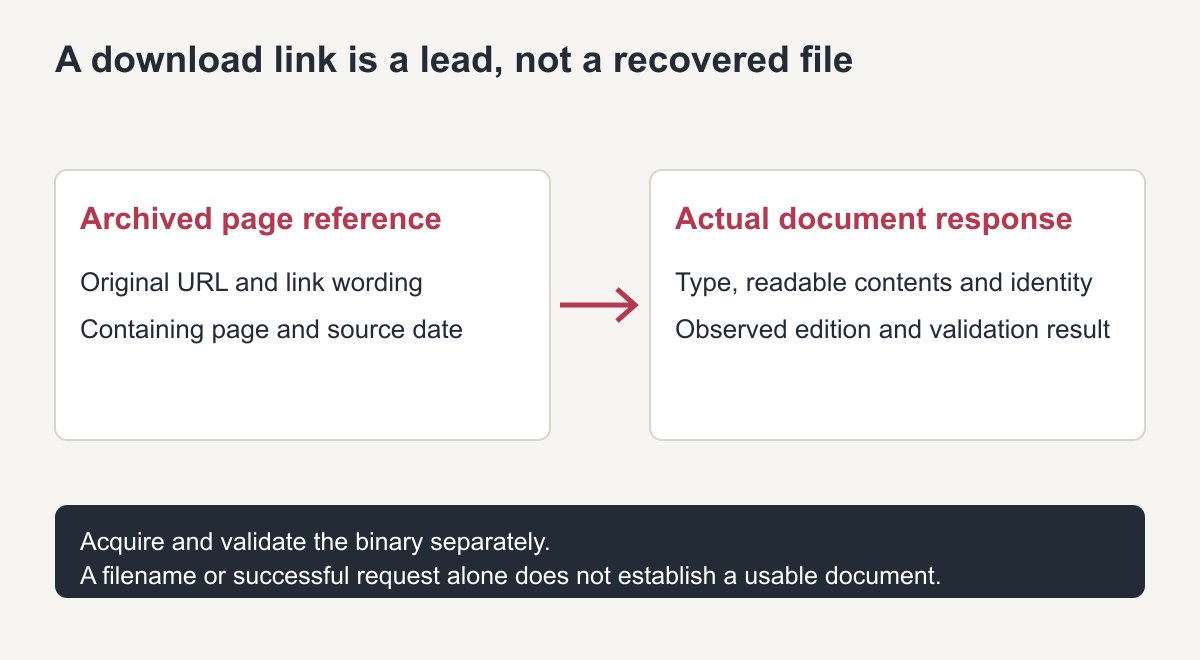
Original document-evidence diagram. The visible link is not the file itself.
Check whether the binary is actually available
Inspect accessible archive records for the known document URL and relevant periods. If a resource is unavailable, record the actual finding rather than declaring that the archive never collected it. The Wayback help guide explains why dependent resources may be incomplete.
When a response can be acquired, check its final destination, content type and contents. A redirect or an HTML error response may be saved with the apparent PDF filename. Neither is a recovered catalogue merely because a download process finished.
Keep the acquired file unchanged while validation happens on a copy. Preserve its source reference and retrieval date. Handle unfamiliar files in an appropriately protected environment; do not disable security protections or upload private material to an unapproved online repair service.
Validate type, readability and document identity
Use a maintained viewer or parser appropriate to the actual file type. Confirm that a PDF opens, has the expected pages and contains the intended document—not a single error page or another business's brochure. Spot-check tables, diagrams and embedded text where they matter to the document's purpose.
Adobe's PDF troubleshooting guidance distinguishes damaged-file problems from viewer or installation issues. A failure to open warrants investigation; it should not be resolved by renaming an arbitrary response .pdf or claiming that it has been repaired without checking the result.
A file-format signature or an HTTP content-type header can support investigation, but does not establish that the entire document is readable or correct. Record the actual viewer or parser result and the inspection performed.
Respect passwords and access restrictions. A protected document is not an invitation to bypass its controls. Request an authorized accessible original or suitable replacement from the owner when the recovery workflow cannot legitimately read it.
A document inventory that separates leads from usable files
The following worksheet uses illustrative paths and unassessed findings. It does not describe recovered customer documents or executed validation results.
| Original reference example | Intended type | Source record | Validation to perform | Status |
|---|---|---|---|---|
/downloads/catalogue.pdf |
Product catalogue PDF | Full capture URL if found | Open, check page count and catalogue identity | Unassessed |
/manuals/install.pdf?rev=2 |
Specific manual version | Preserve address and observed source date | Confirm revision and diagram readability | Unassessed |
/forms/request.docx |
Editable document | Captured binary or authorized owner original | Validate actual format and readable content | Unassessed |
/downloads/specifications.zip |
Download archive | Full inspected source reference | Inspect archive contents safely before use | Unassessed |
For each real item, add the delivered filename, actual format, size, validation result, permitted use and intended page link. If a file is absent or protected, record that state instead of leaving a misleading “downloaded” tick.
Keep versions and current use clear
Two files with the same catalogue title may contain different products, instructions or prices. Record their observed source dates and identifiable revisions, and ask which version is appropriate for current publication.
When a historical document is intentionally retained, label its age or edition clearly where users encounter it. If an approved current replacement is supplied, do not describe it as recovered from the archive. Keep both provenance and the publication decision in the inventory.
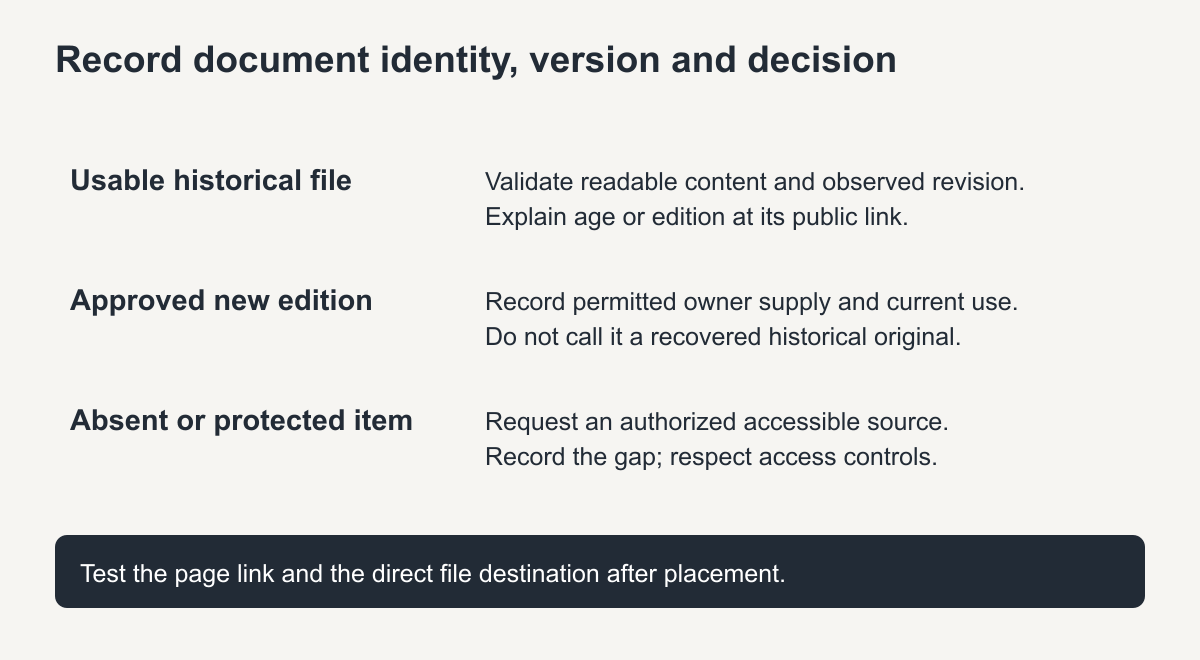
Original version-and-status guide. A newly supplied edition is not a recovered historical original.
Repair the download journey, not just the filename
Place each accepted file at the agreed destination, then update the page references that use it. Preserve a useful original path where that is part of the scope, or record any deliberate destination change. Do not replace every missing PDF with the same generic brochure.
Open the restored link from the actual page and also request the document directly. Check that the destination is the correct binary and that its visible link label describes the supplied edition. On a mobile device, make sure the download or viewer arrangement is usable in the intended environment.
For missing files, request the original source document, a permitted current edition or an explicit decision to remove the unavailable download. A truthful absence is better than a link that suggests essential specifications exist when they do not.
The HTML ZIP preparation guide explains how document entries fit a page-and-asset manifest. For a scoped HTML recovery service, ask whether document retrieval, validation and link repair are included, and which inputs remain your responsibility.
The handover should identify each usable file, its version and test result, alongside every document that remains unavailable. That record is more valuable than a folder whose filenames merely resemble the missing downloads.
Recover PDFs and downloads: quick checklist
- Find the exact file address from the archived page that linked to it.
- Open the archived file and confirm it is the real document, not an error page.
- Check that the file opens fully and all pages are readable.
- Upload it to the restored site and update every link to the new location.
Keeping downloads organised
Store recovered files in one clear folder structure, for example by year or topic, and keep a short list of each file with the page that links to it. This makes later updates and link checks much easier.
Looking for archived media rather than documents? See how to find and download archived videos, including what to expect for old YouTube links.
Frequently asked questions
Can I recover PDFs and downloads that the archive never captured?
No. If the file itself was not archived, only the link survives. Look for copies in email attachments or old shared drives instead.
Are archived PDFs the latest version?
Not always. A capture shows the file at that date, so check whether a newer version existed before publishing it again.
Should old downloads keep their original file names?
Yes where possible, so existing links and bookmarks still work. If a name must change, redirect the old address.