
Published by Wayback Downloader.
Recovering a deleted website without a backup starts with preserving any surviving data and checking what was actually deleted. Collect authorized hosting copies, local files, content exports and public page captures, then choose between restoring original data, reconstructing useful public content or creating a new site. If no source contains an item, treat it as missing rather than calling a replacement “recovered.”
Not sure what survived? Start with a free archive review before you download anything. Or see the prices for each format.
You do not need to find every historical page before making a decision. You need enough evidence to identify a feasible recovery route and the essential material that route cannot supply.

Stop changes that could destroy the remaining evidence
If you still have access to the affected account, avoid reinstalling the CMS, clearing storage or repeatedly deploying over it while investigating. Ask the hosting provider or responsible administrator to preserve the current state and explain what recovery options exist. Do not run file-recovery utilities against a live customer server without a qualified, authorized recovery plan.
Write down the deletion time as accurately as possible, what action preceded it and what stopped working. Was the whole hosting account removed, a folder deleted, the database lost, or only a set of pages removed from the CMS? These are different incidents. If the account expired rather than an editor deleting content, follow the hosting-loss diagnostic first.
Record important paths from your own records: saved navigation, campaigns, invoices, content lists and developer handovers. Prioritize pages customers use to understand the business, contact it or complete essential tasks. Preserve a screenshot of the current error for your incident notes, but do not mistake it for proof of recoverable content.
Use a source worksheet instead of a pile of unverified files
Start with the people and systems that previously held authorized copies. Ask the host whether another snapshot exists, the developer whether a delivered project folder survives, and content owners whether they have source documents or photographs. Check backups stored separately from the deleted account.
For a WordPress site, distinguish the database from files. A themes-and-uploads folder may be valuable, but it does not establish that the posts, settings and other database records survive. The WordPress backup documentation explains why full restoration normally requires both.
Use the worksheet below to make decisions. The rows are illustrative source types, not a report of recovered client data. Replace each unassessed entry with an actual observation.
| Source | Ownership or permission | Date or version | Content type | Reliability check | Current finding |
|---|---|---|---|---|---|
| Host-provided export | Confirm account authorization | Provider-supplied date | Files and/or database | Open a copy; confirm correct site and components | Unassessed |
| Developer delivery folder | Confirm your permitted use | Handover version | Source files, assets, notes | Compare with the last approved website | Unassessed |
| CMS content export | Confirm owner supplied it | Export date | Structured content | Inspect included fields and media references | Unassessed |
| Archived page | Confirm permission to republish | Actual capture timestamp | Public page output | Open page and linked resources | Unassessed |
| Screenshot or content document | Confirm source and permission | Known creation date | Visual reference or text | Compare against another source if available | Unassessed |
“Unassessed” is deliberately not a pass. Record a finding such as “contains service copy but not images,” “wrong website,” or “database export opens, version unknown.” That is more useful than marking an entire folder recovered after seeing its filename.
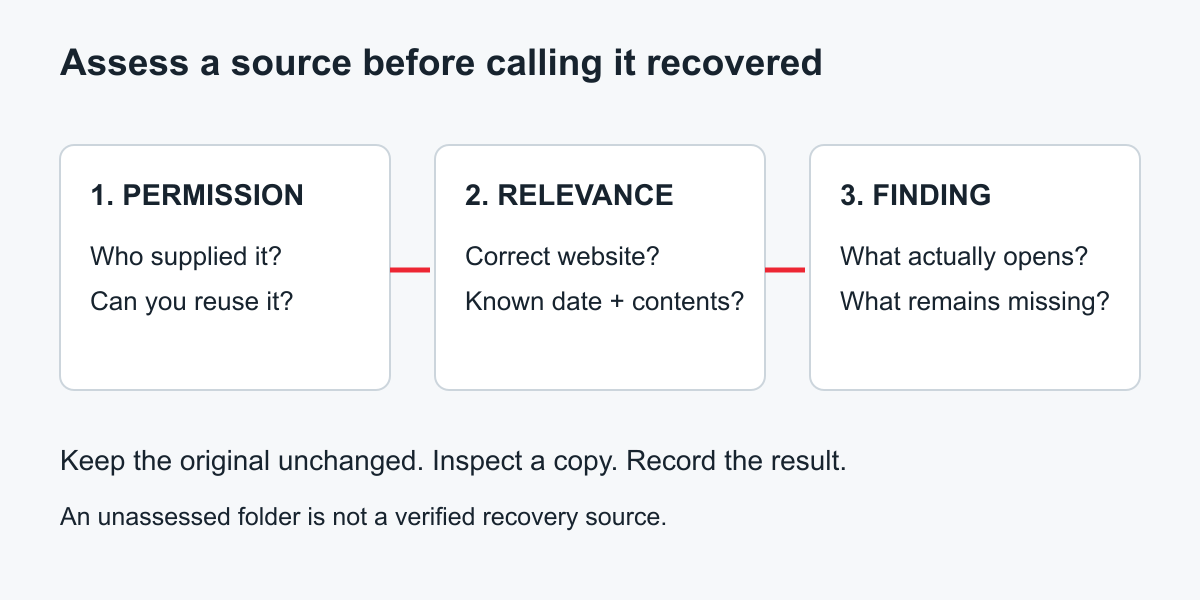
Original worksheet companion diagram. A source becomes useful only after its relevance and contents are assessed.
Keep an untouched copy of every supplied file. Record where it came from and who may review private material. A shared public folder is not an appropriate place to distribute a customer database.
Check archive coverage against the essential page list
Search the Wayback Machine for the original domain and specific known URLs. Open representative pages from the period you want. Confirm the copy is the intended site rather than a parking page, error response or later unrelated business.
Check text, imagery and downloads independently. A page may preserve a product description while its image file is missing. An intact menu label may lead to an uncaptured destination. Save a source reference for each usable item rather than treating a single homepage as evidence for the whole site.
Create a simple finding for each essential page: usable content, partial content, visual reference only, or no useful source found. Add a note about old facts that need owner approval. Historical opening hours and discontinued services should not become current customer information without review.
If known URLs have no usable capture, follow the missing-Wayback-source investigation to distinguish an unavailable lookup from absent evidence and assess other sources.
There is a firm boundary between public reconstruction and original-system recovery. Public captures can support a new implementation of visible content and layouts; they do not supply uncaptured private databases, credentials, historical orders or server-side application code. New functions require current configuration and authorized business inputs.
Choose the route your evidence supports
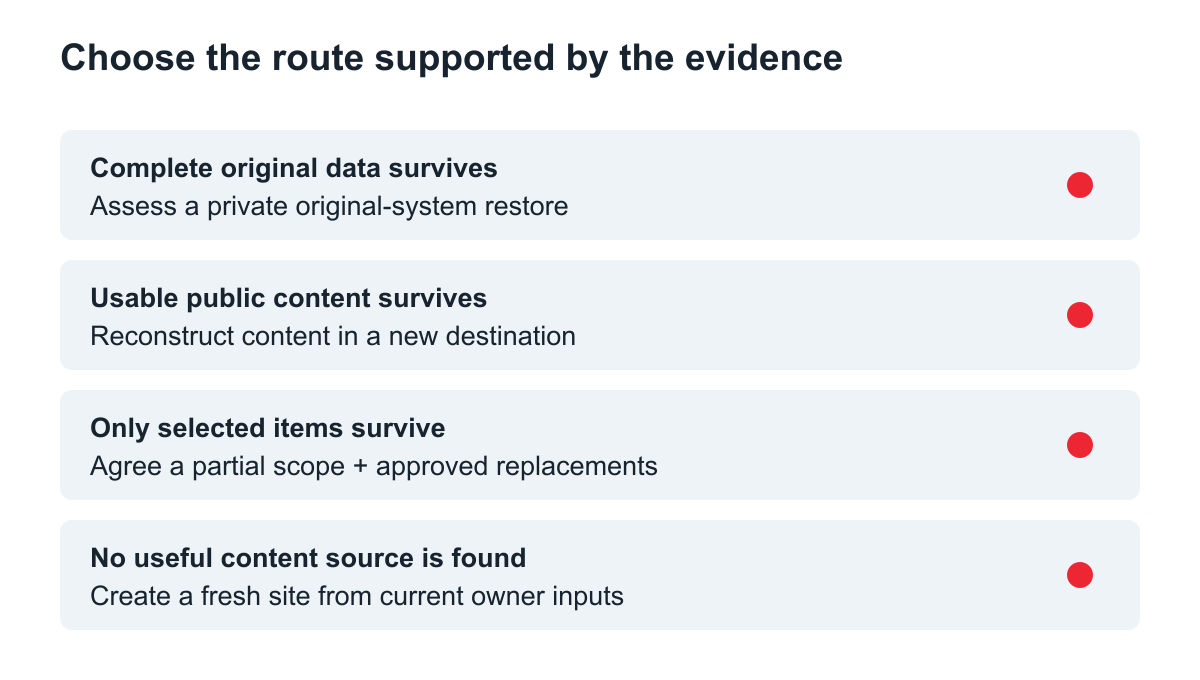
An original decision diagram, not a promise that any branch is available for your website.
Original data survives elsewhere
If another source contains a suitable complete copy, ask a qualified maintainer to assess and restore it privately. Check its date and compatibility, and investigate the deletion cause before exposing the restored installation. Having discovered a backup changes the job: you are no longer dependent on reconstructing everything from public pages.
Public content survives, but the original installation does not
Build a new site using the recovered copy and assets, preserving useful original paths where practical. Choose an editing format that suits current maintenance. WordPress content reconstruction can provide a new editable destination without suggesting that old application data was recovered.
Define essential functions separately. For example, recovered contact-page labels can guide a new form, but its recipient, validation and notification behavior need present-day decisions. Record replacement photographs and newly written descriptions as replacements, not captured originals.
Only part of the business content survives
Recover the pages that still have reliable evidence and commission the missing material separately. A useful partial launch might include the current service explanation and contact details while an old resource library remains unavailable. Agree what is included, postponed or deliberately retired before implementation.
No useful copy is available
Create a fresh site from approved business information. Existing branding files or screenshots can inform its direction, but cannot establish the wording or behavior of unseen pages. Do not fill the gaps with invented historical text just to imitate a complete restoration.
Make a minimum recovery scope you can actually accept
Choose a small group of essential pages and write an acceptance condition for each. “About page rebuilt” is vague; “approved company description appears at the agreed URL, with the supplied logo and working contact link” is testable.
For each missing item, assign one of three decisions: find another authorized source, create an approved replacement, or leave it out of the current scope. Attach an owner and a decision date. This prevents an unresolved catalogue or product field from silently becoming fabricated content.
Before relaunch, compare the delivered pages against your source worksheet, verify current facts, and test the newly implemented functions. Take a new backup of the destination and confirm that someone responsible can restore it. A screenshot of the finished homepage is not enough to document the handover.
Can only the most important pages be recovered?
Yes, a reconstruction scope can focus on selected pages when their sources and priorities are clear. Describe what is excluded so a partial project is not represented as a complete historical copy. Where the archive evidence is hard to judge, request an assessment of surviving captures before selecting a deliverable.
What should happen when the database is gone?
First establish whether another authorized database copy or export exists. If none does, rebuild supported public content in a new installation and treat private operational records as a separate loss. Do not import guessed account or transaction data to make the new system look populated.
The right recovery decision follows the evidence: restore a genuine copy when one exists, reconstruct what can be supported, and clearly identify what must be created anew.