
Published by Wayback Downloader.
When an archived website loses its styling, first determine whether a stylesheet is absent, its reference is wrong, or its rules are not applying. Recover available style sources where possible. If sufficient original CSS does not survive, reconstruct an approved presentation from reliable visual evidence and owner-supplied brand material, documenting new choices and uncertain details.
Prefer to skip the manual work? We can download your archived site as clean HTML with archive code removed and links fixed. You can also request a free Wayback archive check first.
New CSS can make surviving content usable and visually consistent. It should not be described as recovered original source, and a desktop capture alone cannot prove an unknown historical mobile layout.

Separate resource problems from rule problems
Inspect the acquired page's stylesheet references and their resolved destinations. Confirm that a response is actually CSS rather than a redirect or HTML error document. A valid filename does not establish a valid stylesheet.
If the file exists, check whether its selectors match the delivered markup and whether other rules override it. MDN's CSS debugging guide explains inspecting applied rules and the rendered document. Use those checks to identify a specific cause instead of replacing every style blindly.
The reference-repair guide covers original bases and known destination mapping. A wrong CSS path is a link problem; an absent stylesheet is a source gap; an overridden declaration is an implementation problem. They need different remedies.
Look for compatible styles, not arbitrary substitutes
Check known stylesheet URLs and suitable captures around the approved version. Other pages may share a useful stylesheet. An owner-held original or authorized backup can also contribute. Record the actual file, source date and compatibility decision.
Do not silently mix a later redesign's stylesheet with earlier markup. Class names, layout structure, asset addresses and business identity may have changed. Preserve originals and test working copies before accepting a supplement.
Inspect referenced fonts, images and imported styles as separate dependencies. A CSS response can survive while its background image or font does not. Confirm permitted use before deploying a substitute asset.
Use a dependency and evidence inventory
This worksheet is unfilled and uses illustrative references. It is not a report that these files were captured or restored for a real website.
| Example item | Check | Finding to record |
|---|---|---|
/css/site.css |
Actual CSS response, applicable selectors and source version | Usable original, wrong path, absent file or incompatible version |
| An imported stylesheet | Resolved address and required rules | Actual dependency and inspected response |
| A background image URL | Binary, intended crop and source date | Usable image or approved replacement/gap |
| A font reference | Available file, license and intended use | Permitted original or approved substitution |
| A narrow-screen layout | Available evidence and current requirements | Observed behavior or explicitly new responsive decision |
For visual reconstruction, record important content widths, relative spacing, typography hierarchy, colors and section arrangement. Mark each observation's source. Estimated values should remain identified as estimates rather than being converted into fictitious historical measurements.
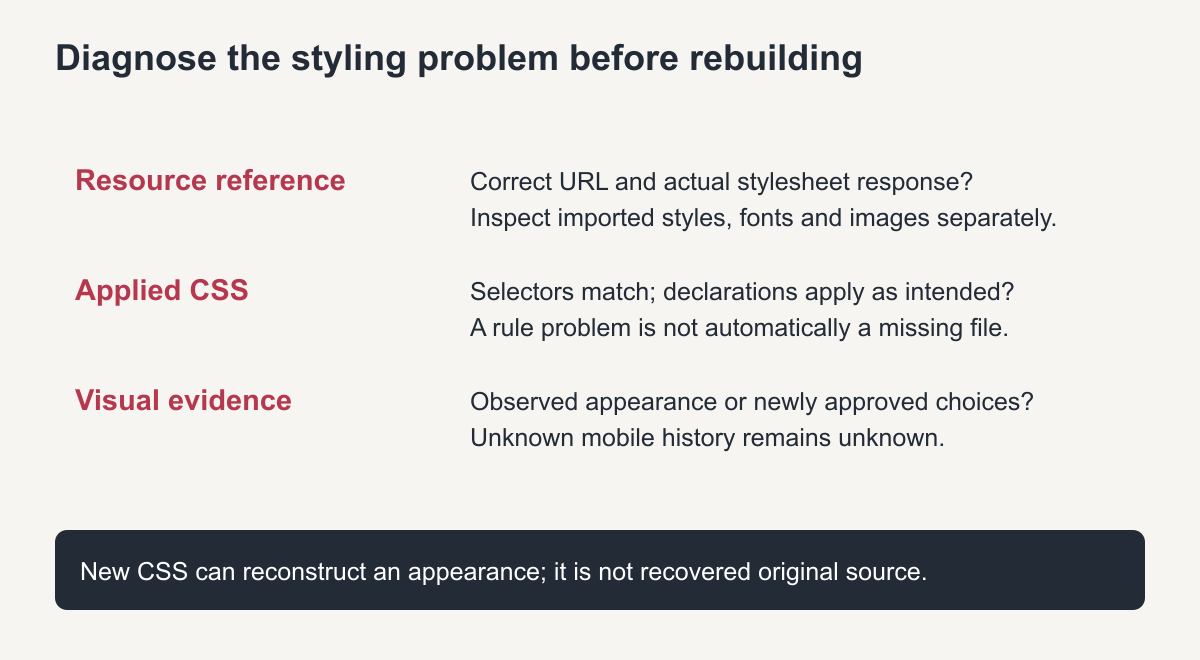
Original diagnosis diagram. A layout gap is not automatically a missing file.
A reproducible synthetic styling demonstration
The following visual is an actual browser capture of a small teaching fixture created for this guide. It is not a client website or a historical before-and-after result. Both panels contain the same sample heading, paragraph and link: the first has no section-specific styles, while the second uses newly authored CSS.
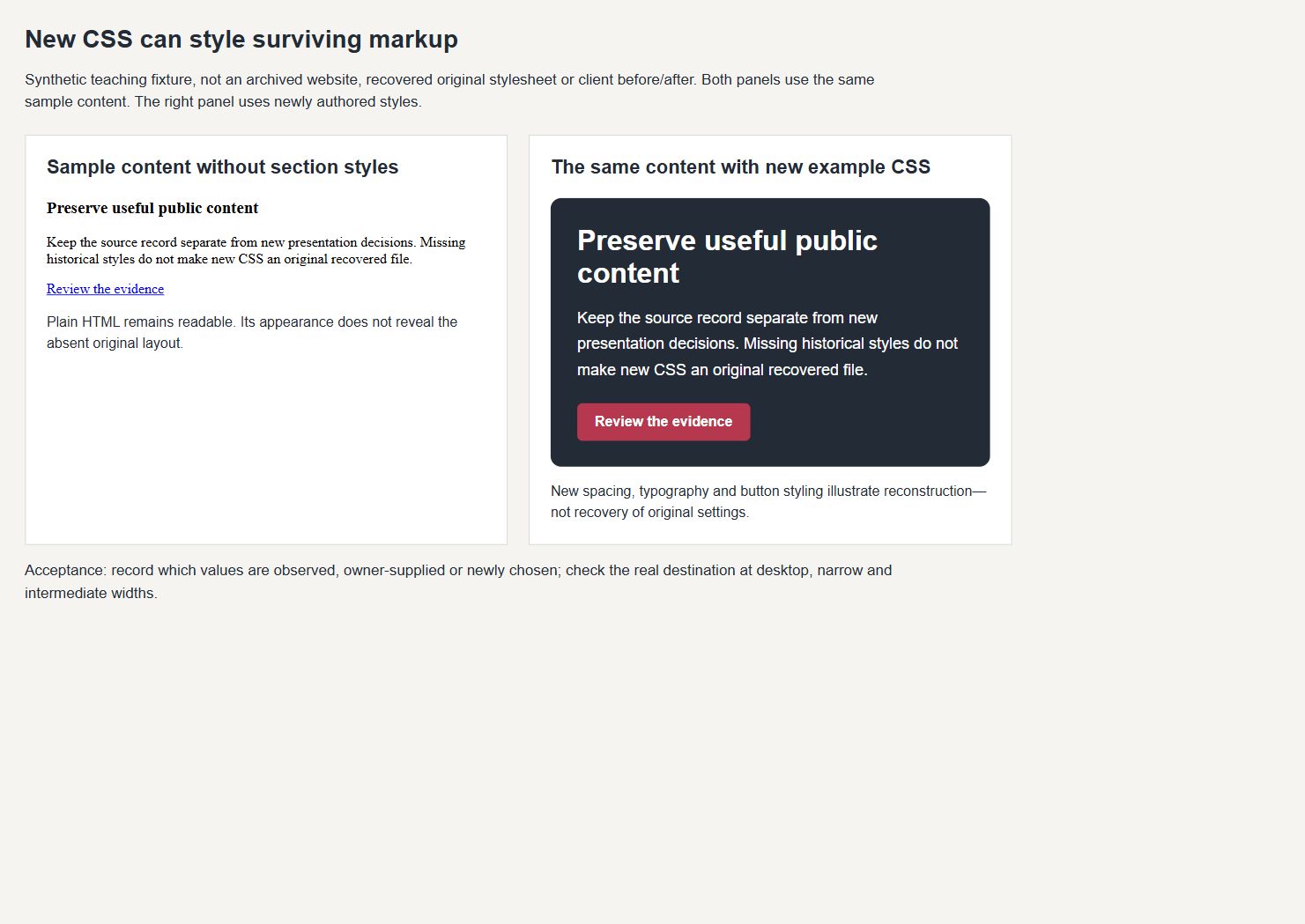
Actual browser capture of a synthetic example. The new typography, spacing and button treatment demonstrate styling work, not recovery of an original stylesheet.
The new section uses a dark background, a readable heading scale and independent paragraph spacing. Its comparison layout uses two columns on a wide screen and one column at a narrow breakpoint. Those are explicitly new choices. Another appropriate reconstruction could choose different values if its approved evidence and requirements differ.
To reproduce the principle on an authorized test copy, keep the same content and structure, apply a small scoped stylesheet, and compare the saved output at wide and narrow widths. Record the actual results. Do not label a visual resemblance as proof that unknown original CSS declarations were recovered.
Reconstruct responsive behavior honestly
Use available mobile captures when they are suitable, then identify the remaining requirements. MDN's media-query reference explains conditional CSS behavior; it does not supply the original site's absent breakpoints.
When mobile evidence is missing, agree on readable content order, image crops, navigation and spacing for the current site. Check intermediate widths, long headings and real content, not only an empty layout. Prevent page-wide horizontal overflow while keeping genuine wide tables or code accessible.
If building in Elementor, specify which native controls implement the intended arrangement and which parts remain code-managed. The editor choice does not remove the need for evidence and acceptance checks.
Compare the implemented result and state its limits
Compare the working destination with the approved source references at known widths. Review hierarchy, section arrangement, usable assets and important interactions separately. Record mismatches caused by absent evidence, approved improvements or implementation defects.
The incomplete-snapshot guide provides a broader gap register. Link the CSS decisions to that record so the owner knows which parts were recovered and which were newly built.
For Elementor WordPress reconstruction, ask for the dependency inventory, source references and responsive acceptance evidence. A useful rebuilt layout can be delivered without an original stylesheet; it must still be presented truthfully as reconstruction where new work was necessary.
How to recreate missing CSS when nothing else works
- Search other capture dates for the stylesheet address; it may exist under a different date than the page.
- Check for the framework. Class names often reveal a known theme or framework whose public stylesheet can stand in for the missing one.
- Rebuild from screenshots. If no stylesheet survives, use the archived page images as a reference and write new styles for the layout, colours and fonts.
- Start with structure. Recreate the grid, header and navigation first, then typography, then details such as buttons and borders.
- Test against the archive side by side at desktop and mobile widths.
Keeping recreated styles maintainable
Put all recreated rules in one stylesheet with clear comments for each section, such as header, navigation, content and footer. Use a small set of colour and font variables so later changes happen in one place. Avoid inline styles scattered across pages, because they make future edits slow and inconsistent.
Document which rules were recreated and which were copied from surviving files, so later developers know where each style came from.
Frequently asked questions
Can you recreate missing CSS exactly?
Only if the original file is found. Otherwise the result is a close, faithful match rather than a byte-for-byte copy, and differences should be noted.
Should I copy CSS from another website?
No. Use the original if it can be found, or write new styles. Copying another site’s stylesheet can bring licensing problems and unrelated rules.
Will recreated CSS work on mobile?
It should be written to. When you recreate missing CSS, add responsive rules so the restored layout works on phones, even if the original did not.