
Published by Wayback Downloader.
You can download a Wayback website as a clean HTML ZIP, but saving pages is only the start. To download a website from the Wayback Machine as HTML, select the required captures, collect their accessible HTML and public dependencies, map the files to a consistent directory structure, then clean and test a working copy before compressing it. A saved response or collection of pages is not automatically a deployable website.
Prefer to skip the manual work? Use our HTML ZIP download service to download a Wayback website with archive code removed and links fixed. You can also request a free check of what the archive saved first.
The deliverable here is an HTML file package. It is different from rebuilding an editable CMS, recovering an original database or recreating application functions that the public archive never preserved.

Before you download a Wayback website, define the pages and capture period
List the original URLs you need and the business version they should represent. Start with essential pages, then add articles, downloads and other content that belongs in the agreed scope. Record a full capture reference and observed date for each selected item.
Do not let a broad retrieval process decide the business version accidentally. A domain may contain expired pages, later redesigns or unrelated ownership periods. Inspect representative pages before collecting a large bundle.
Record permission to reuse the content and assets. Public accessibility is not a substitute for ownership or a license, and an HTML package should not contain another party's unrelated material merely because a link led to it.
For an incomplete list of pages, the historical URL inventory guide explains collecting leads and distinguishing those discoveries from the current site's sitemap.
Collect responses and dependencies separately
A technical operator can use an HTTP client to retrieve a verified public capture URL. For example, curl can follow redirects and save a response to a chosen file, as its official manual describes.
The following command is a template, not a tested customer recovery. In a new working directory, replace the placeholder with the full public capture URL you inspected. Use curl.exe on Windows where needed to select the actual curl program rather than a shell alias.
curl --fail --location --output source-page.html "PASTE_PUBLIC_CAPTURE_URL"
This requests one response. It does not recursively download the website, render JavaScript, acquire every dependent file or verify that the final response is the intended historical content. Inspect the saved file and any redirect outcome before counting it as collected. Do not disable certificate checks to force a failed request through.
Keep an untouched source copy and a separate cleanup copy. Collect accessible images, stylesheets, scripts, fonts and documents that the required pages actually use. The Wayback help guide explains that dependent resources can be missing; an HTML reference is not proof that its target survived.
Observe service restrictions and failed responses. Reduce the collection scope or pause when access is unavailable. Do not bypass controls or promise that a larger request queue will recover uncaptured files.
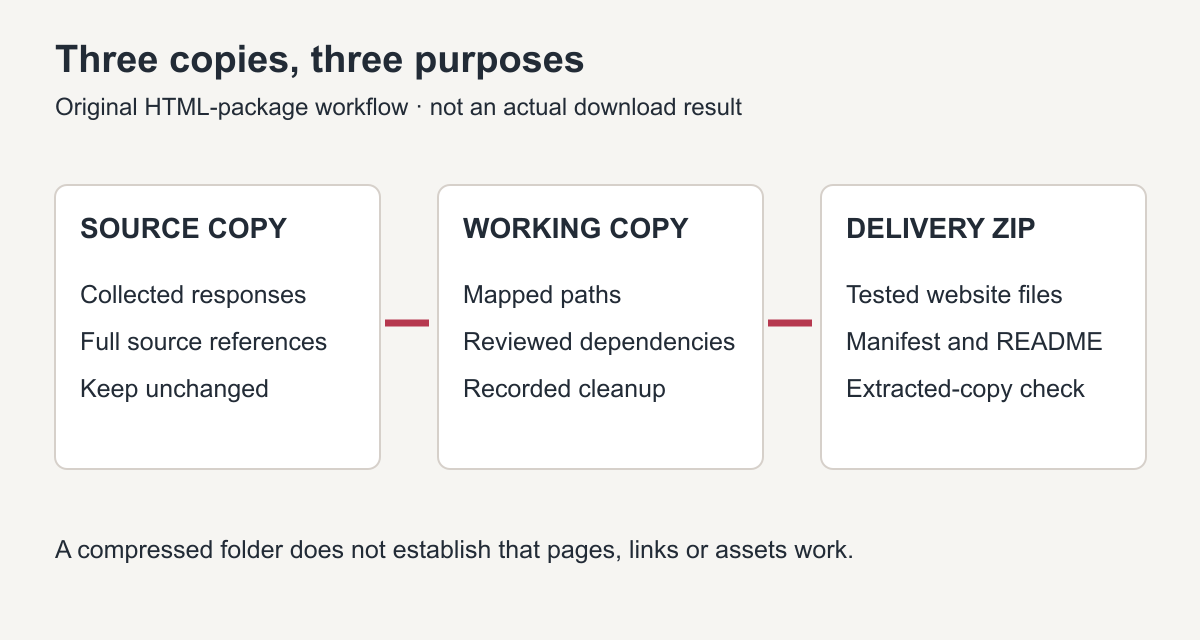
Original package workflow. Keeping source material separate makes cleanup decisions traceable.
Map URLs to files before rewriting references
Decide how the intended host will serve the site's paths. A directory-style page such as /about/ can be represented by about/index.html on a compatible static host. A historical /about.html address is a different path; preserve it when that is the requirement rather than silently changing the address style.
For every collected page and asset, record its original address, source reference and local destination. Watch for filenames that collide, query-string variants, capitalization and resources supplied from another domain. Give distinct required resources distinct destinations.
Review relative links against the page's actual location. MDN's HTML base-element reference explains that a document's base URL affects relative references. A retained historical or archive <base> value can send apparently local links somewhere unintended. Change it only after understanding the mapping and retest the affected references.
Do not remove all JavaScript as a shortcut. Some scripts may support required navigation, while old tracking, archive replay behavior or unavailable services may be irrelevant or unsafe. Inspect the role of each dependency and document replacements or removals in the working copy.
Illustrative ZIP structure and manifest
This directory tree is an example of an agreed static package, not a downloaded customer site or a promise that these files exist in an archive.
reconstructed-site/
  index.html
  about/
    index.html
  services/
    index.html
  assets/
    css/site.css
    images/approved-logo.png
  handover/
    page-asset-manifest.csv
    readme.txt
The handover files describe the package. They should not contain passwords, private customer records or credentials for deployment. A host may not need the handover directory in its public document root.
| Original item | Intended package destination | Source record | Required verification |
|---|---|---|---|
| Homepage | index.html |
Actual inspected capture reference | Correct business version and main navigation |
| About page | about/index.html |
Actual inspected capture reference | Direct page route and approved text |
| Logo file | assets/images/approved-logo.png |
Captured original or owner-supplied file | Correct binary, permitted use and image references |
| Stylesheet | assets/css/site.css |
Collected source plus recorded cleanup | Expected styling without archive dependency |
| Catalogue link | Agreed document destination | Supplied file or unresolved finding | Correct file opens, or absence is explicitly handled |
Do not mark the catalogue complete because its link appears. If the binary is missing, request an authorized copy or agree a clear change to scope.
The archived-document recovery guide separates a visible download link from a readable PDF or other actual binary and provides a version-aware document inventory.
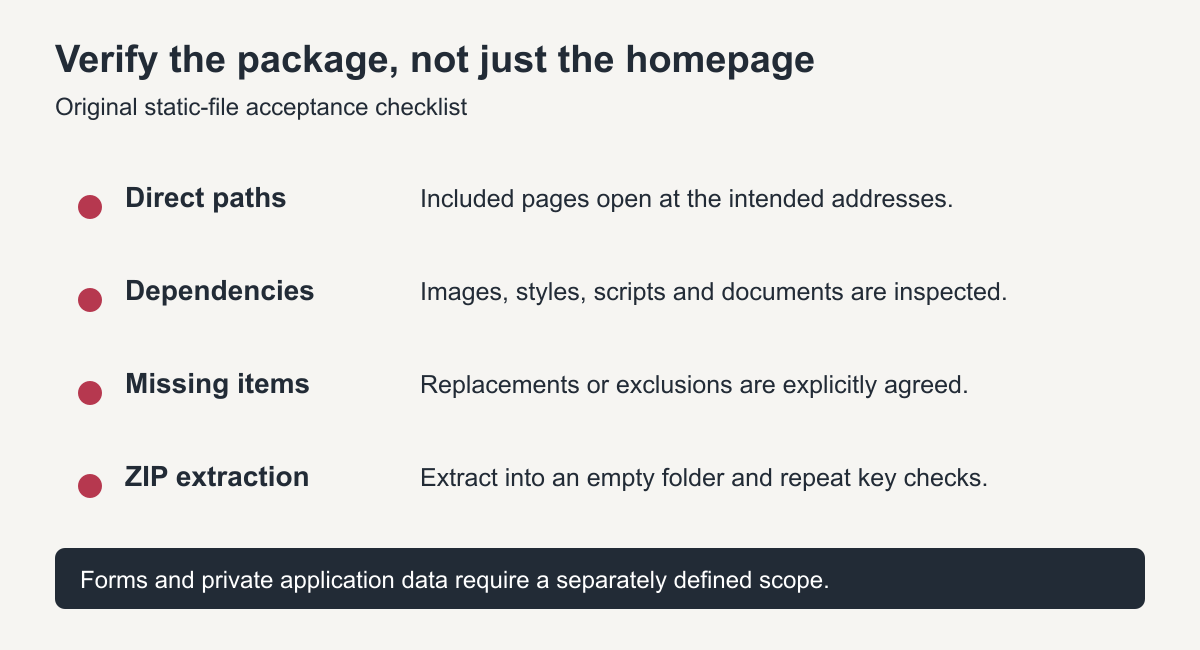
Original acceptance diagram. Compression is the final packaging step, not the verification method.
Preview, extract and test before delivery
Preview the working copy through a local HTTP server suited to static files, or a private staging destination. Opening one file directly is not enough to test root-relative paths, host routing or all resource requests.
Open every included page directly and follow its important links. Check images and downloads, inspect failed resource requests, and ensure navigation does not unexpectedly depend on archive replay or the defunct live domain. Record deliberate external links rather than treating every external reference as an error.
For references that need repair, use the source-to-destination link-mapping workflow. For absent pictures, the missing-image recovery guide explains how to inspect original resource addresses and image variants before approving replacements.
Compress the tested working folder, extract the ZIP into a separate empty directory, and repeat representative checks. Include a short README stating the entry point, intended hosting assumptions, source period, missing items and separately required functionality.
The restored-site hosting guide covers the next stage: confirming the destination's public root, testing actual routing, and documenting authorized launch and ownership handover.
A contact form in static HTML still needs an agreed functioning submission service or backend. An HTML ZIP does not include an uncaptured WordPress database, historical orders or private account records. Put those boundaries in the handover instead of relying on the buyer to discover them.
When to use a download-and-cleanup service
Use a scoped HTML website restoration service when capture assessment, asset collection or path cleanup needs specialist work. Ask which pages, assets, missing-item decisions, preview checks and deployment instructions are included.
Do not buy on the word “download” alone. A good package is defined by its inspected sources, correctly mapped files and documented limits—not by an unsupported promise of a complete one-click copy.
The download-versus-restoration comparison helps distinguish raw retrieval, reviewed static files and a newly implemented website when choosing that scope. If you only need raw files for reference, you can download a Wayback website yourself; if you need a copy that opens and links correctly, the cleanup is where most of the work is.