
Published by Wayback Downloader.
To find historical URLs for a website, combine accessible archive material with authorized owner sources, then inspect and classify the individual addresses. Keep that historical inventory separate from the current XML sitemap: the latter should list suitable live canonical destinations, not every old address you discovered.
Prefer to skip the manual work? We can Wayback Machine to HTML download with archive code removed and links fixed. You can also request a free Wayback archive check first.
A historical sitemap or captured menu is a discovery source. It does not prove that each linked page body was archived, can be recovered or belongs in the new website.

Find historical URLs and record each source
Start with known pages, captured navigation, category listings and available historical sitemap files. Add owner-held exports, old content lists, permitted server logs and authorized analytics records when available. Record the source that identified each address so uncertain discoveries can be reviewed later.
The Wayback Machine help documentation explains archived access and its limitations. Inspect individual captures instead of declaring all listed URLs recoverable. Where an address has no usable body, keep it in the inventory as an unresolved lead.
Include important documents and media dependencies in the restoration inventory, while recognizing that they may have different sitemap treatment from HTML pages. Avoid treating tracking endpoints, account actions and external navigation destinations as missing public pages to reconstruct.
Normalize cautiously and preserve the raw evidence
Store the originally discovered URL alongside a normalized working key. Protocol and hostname variants can be related, but do not merge them solely because their path strings match. Inspect whether the variants actually represent the same intended content.
Preserve meaningful path case, extensions, trailing slashes and query values until their behavior is understood. A product identifier or language parameter may distinguish real content, while a known tracking parameter may not. Fragments generally identify locations within a page, but keep useful fragment targets in the reference-repair work even when they do not create separate sitemap entries.
The reference-mapping guide covers resolving addresses against their original context. Do not use a blind string replacement or query-stripping rule as a substitute for content comparison.
Classify each candidate before deciding its destination
This sample uses example.com and illustrative findings. It is not a recovered customer's URL list or a report of archive availability.
| Historical candidate | Illustrative inventory decision | Current treatment if confirmed |
|---|---|---|
https://example.com/about.html |
Usable public page evidence | Rebuild the approved page at its accepted address |
http://example.com/about.html |
Possible protocol variant; equivalence still needs checking | Map to the chosen equivalent destination if verified |
https://example.com/product?id=7 |
Meaningful product identifier | Keep distinct until its product record is understood |
https://example.com/old-report.html |
Known address, body unresolved | Retain the gap in the inventory; do not claim recovery |
https://example.com/account/ |
Private-function interface rather than public content deliverable | Exclude from public reconstruction unless separately scoped |
Record recoverable, missing, redirected or excluded status with its reason and actual evidence. Reconcile duplicates without losing the original lead. A missing page should not become an irrelevant homepage redirect merely to make a list look complete.
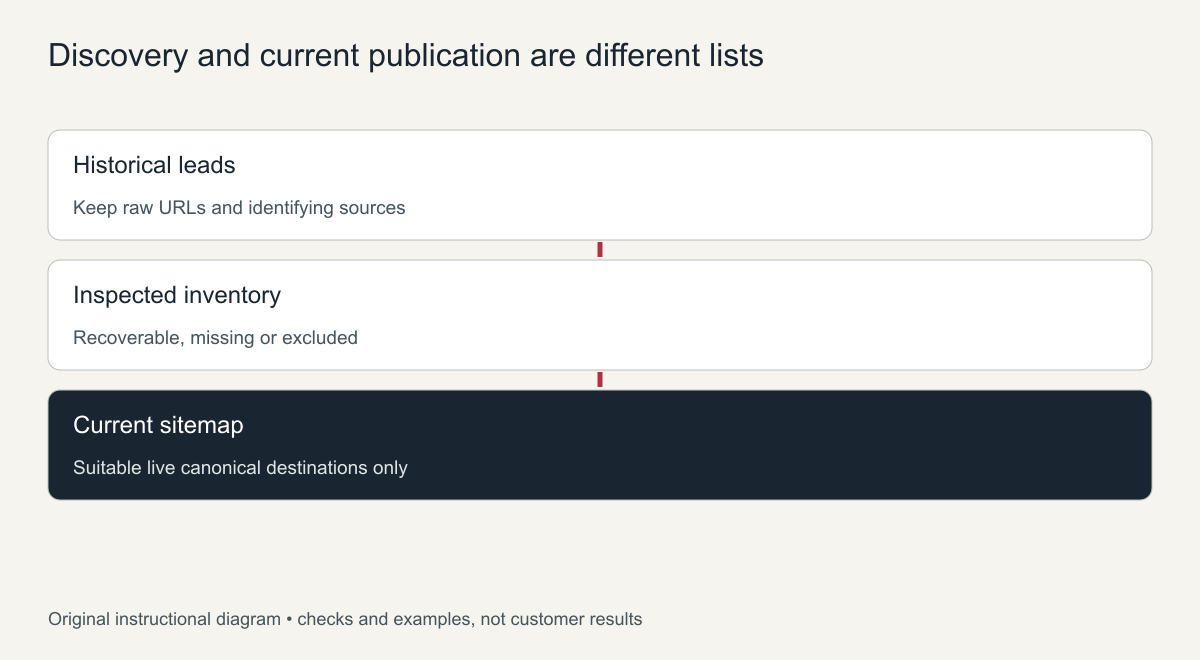
Original inventory-to-publication diagram. Discovery alone does not establish recovery.
The old-URL preservation guide turns accepted inventory decisions into retained paths, justified destination mappings and tests of the actual routing behavior.
Build the current sitemap from checked live destinations
Google's sitemap guidance calls for fully qualified addresses representing the preferred current URLs. Select suitable live canonical pages after checking publication, HTTP responses and indexability. Exclude dead historical paths, redirects and duplicate alternatives from this current list.
The following minimal XML is a format example using example.com. Its two destinations are fictional examples, not a statement that those pages exist or have been submitted.
<?xml version="1.0" encoding="UTF-8"?>
<urlset xmlns="http://www.sitemaps.org/schemas/sitemap/0.9">
  <url><loc>https://example.com/about.html</loc></url>
  <url><loc>https://example.com/catalog/</loc></url>
</urlset>
If you include modification dates, use supported dates of significant current page changes rather than the archive's capture time. Keep the historical evidence dates in the inventory. Let an appropriate CMS sitemap maintain the actual current collection when available, and inspect its output rather than assuming configuration guarantees inclusion.
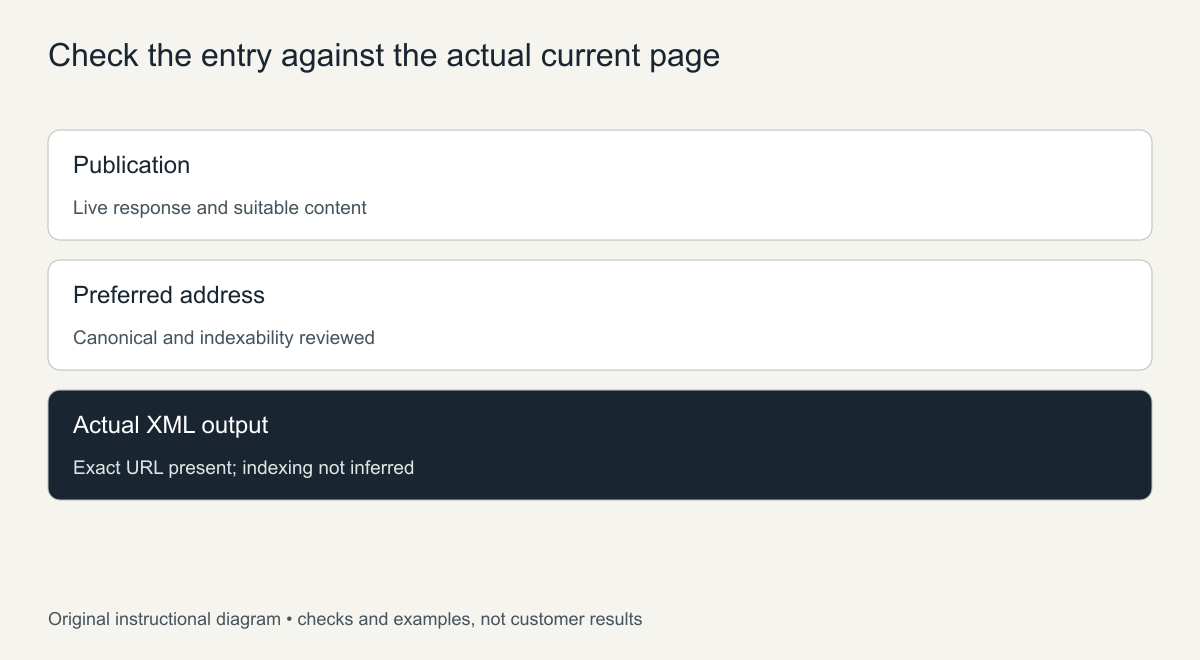
Original entry-review guide. Sitemap presence does not demonstrate indexing or ranking.
Reconcile the two lists after launch
Compare accepted delivered pages with the historical inventory, then compare suitable live destinations with the actual sitemap. An intentionally excluded old address is not a publication defect, while a published eligible page unexpectedly absent from the XML deserves investigation.
Verify incoming contextual links and useful direct paths as well as sitemap entries. For an HTML restoration package, request both the source inventory and delivered URL manifest. They answer different questions: what was discovered and recovered, and what is now publicly available.
Where to find historical URLs
- The archive’s URL listing: the Wayback Machine can list every address it captured for a domain, including pages, images and files.
- Old XML sitemaps: archived copies of sitemap files often list the real pages in one place.
- Search Console: the Pages and Performance reports show URLs Google knew about, even after they broke.
- Analytics: landing page reports show which old pages received visitors.
- Backlink tools: pages other sites linked to are the ones most worth keeping.
- Internal links in captures: menus and footers in archived pages reveal the main structure.
Clean-up rules for a historical URL list
Raw lists contain noise. Remove tracking parameters, session IDs and duplicate versions with and without a trailing slash, but keep a copy of the raw list for reference. If you work from the command line, waybackurls produces this raw list in one step. Group what remains into real pages, media files and system URLs, and only the real pages go into the new sitemap.
Turning the URL list into a rebuild plan
Once the list is clean, add three columns: priority, action and status. Mark pages with links, traffic or business value as high priority. Set the action to rebuild, redirect or retire for each URL. Use the status column to track progress during the restoration. This turns a raw export into a working plan that shows exactly which historical pages will come back, which will forward to a replacement, and which are intentionally retired, so nothing is forgotten when the new site launches.
Share the finished plan with everyone involved in the rebuild. When designers, writers and the person setting up redirects work from the same list, fewer pages slip through the gaps, and the launch checklist can be ticked off directly against it.
Frequently asked questions
What is the fastest way to find historical URLs?
Start with the archive’s URL listing and any old sitemap, then confirm priorities with Search Console and analytics data.
Should every historical URL be in the new sitemap?
No. The sitemap should list only live, indexable pages on the restored site. Old addresses that redirect stay out of it.
How do I know which old URLs matter most?
Those with backlinks, search impressions or visitor history. Give them priority when you rebuild or redirect.