
Published by Wayback Downloader.
Searching for how to download website from Wayback Machine captures? To restore a website from the Wayback Machine, check for a usable backup first, inspect captures of your important pages, collect the available content and assets, then rebuild and test the site in your chosen format. A saved homepage is a starting point—not proof that the rest of the website, its database or its functions can be recovered.
Not sure what survived? Start with a free check of what the archive saved before you download anything. Or download plans and prices for each format.
The most useful outcome of your first review is a list of what you can recover, what needs a new implementation and what is still missing. That list prevents a convincing-looking homepage from concealing an incomplete website.

1. Look for a better source before rebuilding from snapshots
Start with sources you control: hosting backups, a previous developer's handover, local project folders, CMS exports and copies in your own cloud storage. Keep the originals unchanged and work from copies. If the site was compromised, assess the recovered material before installing it on a public server; restoring old files blindly can restore the underlying problem too.
If hosting stopped after a missed renewal, use the hosting-expiry recovery checklist to separate account reactivation from recovery of retained files before deciding to rebuild.
A WordPress files folder and a WordPress database are different sources. A complete restoration normally needs both, as explained in the WordPress backup documentation. An archive-based rebuild is a different route: it uses preserved public output to create a new website rather than recovering the original installation.
Write down the last date when the site worked, the version you want back and the pages the business cannot do without. A five-year-old brochure may be useful evidence without being suitable current customer information. Mark old prices, staff details and contact information for owner review.
Before republishing anything, confirm you own the material or have permission to use it. Public availability does not itself establish permission. If ownership is uncertain, resolve it before treating an archived page as content for a new site.
2. Find a useful capture—and check more than the homepage
Open the Wayback Machine and enter the original domain or a known page URL in its central search field. Open a capture from the period you need. If a page is unavailable, try a known historical address from your records, including its former subdomain or protocol; do not assume the homepage address was the only version used.
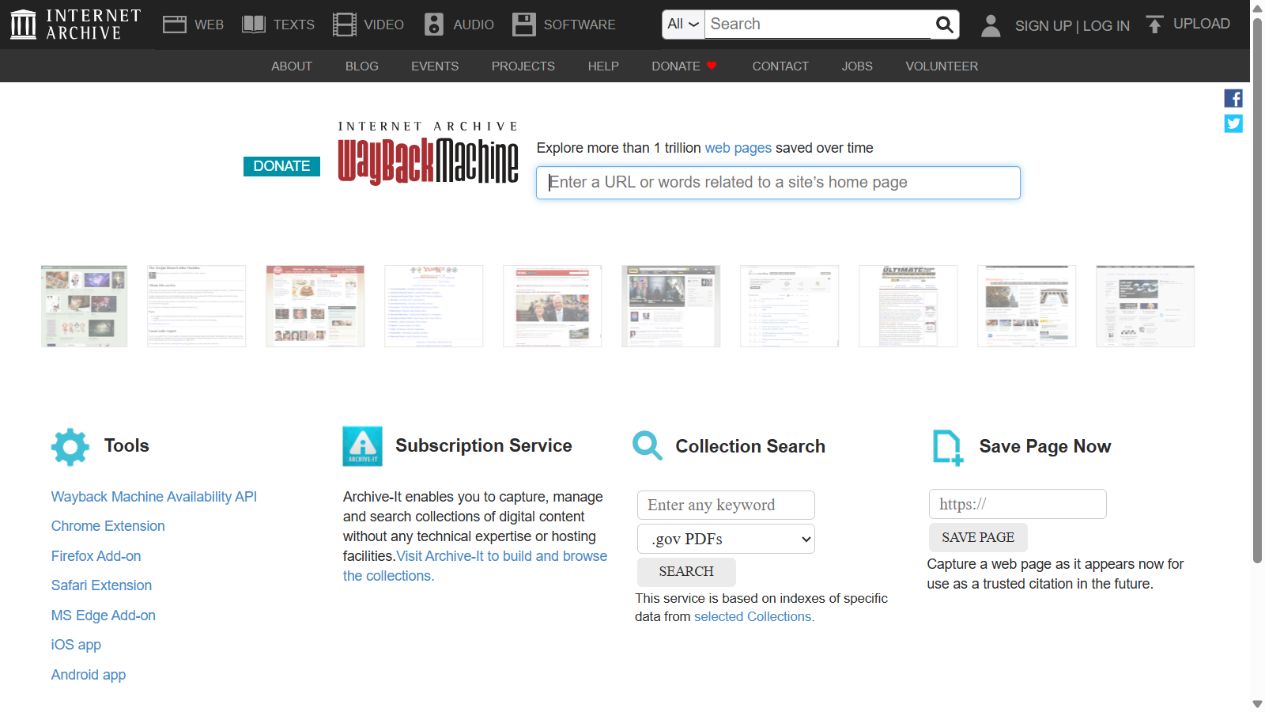
Actual Wayback Machine interface captured on 10 October 2026. The central field searches for a website or URL; it is separate from the Internet Archive's collection search in the top navigation.
Inspect an important service page, an article, a contact page and a download where those existed. Follow their navigation and inspect the capture date on each resulting page. The Internet Archive's help guide explains that incomplete replay can use a nearby capture date. Record the dates you actually use instead of calling the whole reconstruction a single-date copy.
For each page, ask practical questions:
- Is this the intended business website, or an expiry notice, error page or unrelated later version?
- Is the text readable, including lower sections rather than just the first screen?
- Do useful images load at an adequate size?
- Does navigation lead to the expected content?
- Is the layout clear enough to serve as a reconstruction reference?
A calendar marker is not a quality verdict. Open the page and judge its actual content. If the only usable homepage is from one month and a required service page survives from another, note the mismatch and have the owner approve which version to use.
Use the snapshot-selection scorecard when several candidate versions compete; it separates business-version suitability from missing pages and assets.
Keep a source reference with the original URL, the full capture URL, the capture date, the date you inspected it and your finding. Browser bookmarks alone do not explain why one capture was chosen over another.
3. Turn the review into a page-and-asset inventory
Use one row for each required item. Pages and their dependencies need separate checks: a visible download link is not a recovered PDF, and a page containing an image reference is not proof that the image file exists.
Record the original path, source, usable content, missing elements and intended destination. Add a priority such as essential, useful or optional. This gives you a workable scope when some content survives and some does not.
Example: source-to-delivery checklist
The following is an illustrative small-business scope, not a completed client project. “Recovered” means source material is available; “reconstructed” means new work is needed; “missing” means another source or an explicit decision is required.
| Item | Recovered material | Reconstructed work | Missing or unresolved | Acceptance check |
|---|---|---|---|---|
/about/ |
Page copy and logo from selected capture | Editable page structure | Old team details need owner approval | Approved copy appears once; page opens at agreed path |
/services/repair/ |
Headings and most of the description | Layout and internal navigation | Hero photo not captured | Replacement photo approved; key service detail retained |
/contact/ |
Address text and visible field labels | New form and notification setup | Original submissions and email routing | Authorized test reaches the intended recipient |
/downloads/catalogue.pdf |
Link text only | Updated download link after a file is supplied | PDF binary unavailable | Correct document opens; version and permission confirmed |
/shop/item-a/ |
Public description and product image | New product entry and current commerce configuration | Stock, orders and customer records | Owner approves current product data; store tests pass |
Do not mark a row complete because its page looks finished. The catalogue row remains unresolved until there is a usable document or a deliberate decision to remove the download. The contact row needs a working new form, not merely a visual copy of the old fields.
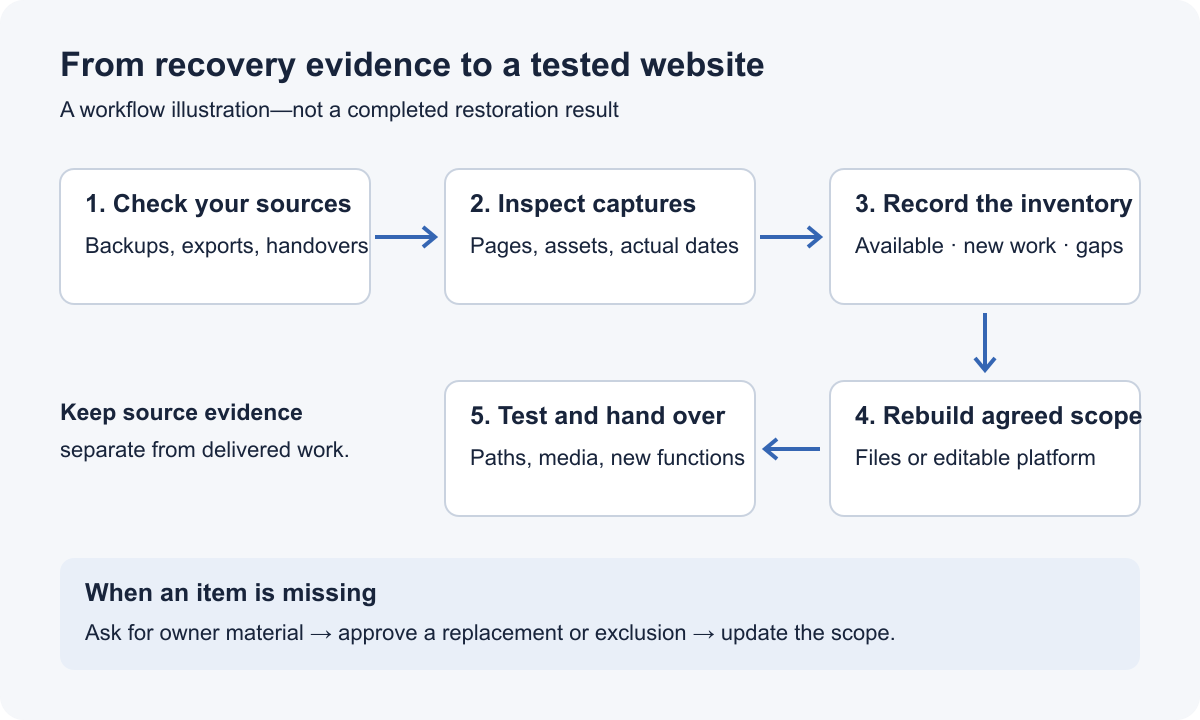
An original workflow diagram. Recovery evidence and delivery testing are separate checkpoints; gaps must be resolved or recorded, not concealed.
Create a separate asset list for images, stylesheets, fonts and documents. For a missing image, inspect its original resource URL and available captures, as the Internet Archive help guide recommends. If it is still unavailable, ask for an owner-supplied file or agree a replacement. Keep replacements distinct from recovered originals.
For a larger site, finish a representative page of each type before attempting every URL. An article, a product and a service page may have different requirements even if they share a header. The pilot exposes missing dependencies before they spread through the rebuild.
4. Choose the output based on how the site will be maintained
The original platform is useful background, but your present editing needs should decide the destination. Rebuilding in the same CMS does not mean the archive recovered that CMS's database. The WordPress reconstruction workflow maps accepted public evidence into new content records and separate current functions.
| Output | Suitable need | What must be built or configured |
|---|---|---|
| Static HTML | A file-based brochure or preserved public site | Working page paths, assets and any separately specified interactive functions |
| WordPress | Ongoing editing of pages and articles | A new CMS installation, content records, media, menus and appropriate templates |
| Elementor on WordPress | Visual editing of page sections | Native editable layout elements and responsive behavior, not a whole page pasted into one HTML widget |
| WooCommerce | An active store using recovered public product content | Current products, tax/shipping/payment settings and new operational workflows from authorized business information |
If you only need files, HTML website restoration is the relevant deliverable. If your team needs to maintain content in a CMS, WordPress restoration creates a new editable destination. These are different jobs, not different labels for the same download.
Define functions separately. For a contact form, confirm fields, recipients, validation and spam handling. For a booking feature, specify the present booking system and required integration. An archived interface does not supply the server-side system behind it.
When the source is incomplete, agree whether the aim is close reconstruction, partial recovery or a redesign using the available material. Do not approve “restore everything” without an itemized scope.
5. Download website from Wayback Machine captures and rebuild privately
Keep the source collection separate from the working site. Retain a dated copy of original captures and supplied files, then organize the rebuild around the agreed URL inventory. Avoid changing historical paths just because a new platform suggests a convenient default.
Move source text into actual content fields, headings, lists and appropriate page structures. Check that meaningful text remains editable. Add recovered media with descriptive filenames and useful alternative text; where a replacement is used, do not present it as the historical original.
Review archive replay links one by one against the destination inventory. An internal link should reach the corresponding rebuilt page; an external citation should remain external. Do not remove every occurrence of web.archive.org indiscriminately: a deliberate source citation may still belong in the article.
Old scripts also need review. Remove archive-specific controls from the delivered website, but distinguish them from scripts the page actually needs. Do not reactivate obsolete tracking, payment or third-party integrations without a present purpose and authorization.
Build missing functions using current settings supplied by the owner. A current form recipient, product price or downloadable document is an approval decision, not something to infer from a historical screenshot. Maintain the inventory as decisions change so the final handover reflects the delivered site rather than the original wish list.
6. Test the destination before switching visitors to it
Open every essential path directly, not only by clicking from the homepage. Check nested pages, images, downloads, navigation and any newly implemented features. Review a narrow screen as well as desktop: readable text, usable controls and visible submit buttons matter more than a close desktop resemblance.
For URL changes, prepare an old-to-new mapping before configuring redirects. Google's site-move documentation recommends corresponding destinations and updated internal links. Redirects on the old domain require control of that domain's serving setup; a new domain alone cannot redirect requests arriving elsewhere.
Record the actual test result, who needs to resolve a failure and what remains outside scope. Do not prefill the acceptance sheet with passes. A missing PDF and a newly tested contact form are different statuses and should stay visible as such.
Before launch, confirm the public canonical URLs, intended indexing settings and the sitemap's live destinations. Development restrictions may be appropriate while you work, but they need deliberate review for a public relaunch. Keep a fresh backup of the rebuilt site and a copy of the handover inventory.
For paid work, agree the delivery and handover responsibilities in advance: file package or installed website, hosting responsibility, access transfer, test ownership and unresolved archive gaps. A deployment is not evidence that former traffic or search rankings have returned.
If what you need is a book, recording or other uploaded file rather than a website, the steps are different; our archive.org download guide covers item files, collections and the ia tool.
When specialist help is the practical next step
Get help when source gaps prevent a defensible scope, many page types need reconstruction, or the destination requires CMS editing or commerce behavior you cannot implement and test reliably. A specialist should be able to explain the source evidence and the proposed deliverable before asking you to approve replacement work.
Send the original domain, preferred period, essential page list, chosen format and the sources you already hold. Include capture links where available. Do not send passwords or private customer records in an initial enquiry.
Wayback Downloader offers manual archive website restoration. If you have selected a format, choose the corresponding restoration service. If the recoverable scope is uncertain, request an archive review before treating a package as the answer to every missing item.
The job is finished when the agreed content and functions work at the destination and the remaining gaps are honestly documented—not when the first archived page has been saved.