
Published by Wayback Downloader.
To recover a website after hosting expires, ask the former provider whether the account is suspended or its files have been deleted, request any retained backup, and confirm that you still control the domain. If no usable hosting copy survives, collect your own files and assess public archive captures before planning a rebuild on new hosting. Paying a renewal invoice does not establish that deleted website data has been restored.
Not sure what survived? Start with a free archive review before you download anything. Or see the prices for each format.
The first goal is to identify which service failed and which sources still exist. That prevents buying a new hosting plan when the original site is recoverable, or waiting for a renewal to bring back files that the provider no longer holds.

Separate the domain, DNS and hosting account
A domain registration gives you control of a name. Hosting provides the environment that serves the website's files and application. DNS, the Domain Name System, connects names to their configured destinations. These responsibilities may be sold together, but they are not the same recovery problem. ICANN's registration overview explains the registrar relationship separately from associated services such as hosting.
Check the registrar account for the registration status, renewal notices and current nameservers. Check the hosting account independently for suspension notices, cancellation history and available files. Record the exact browser message and when it began; an expired certificate or routing error is not proof that the content was deleted.
Do not change nameservers simply to see whether the website returns. Record the existing DNS configuration first, including email-related records. Moving website traffic and preserving business email are separate tasks. Ask your provider or administrator to explain any proposed changes before applying them.
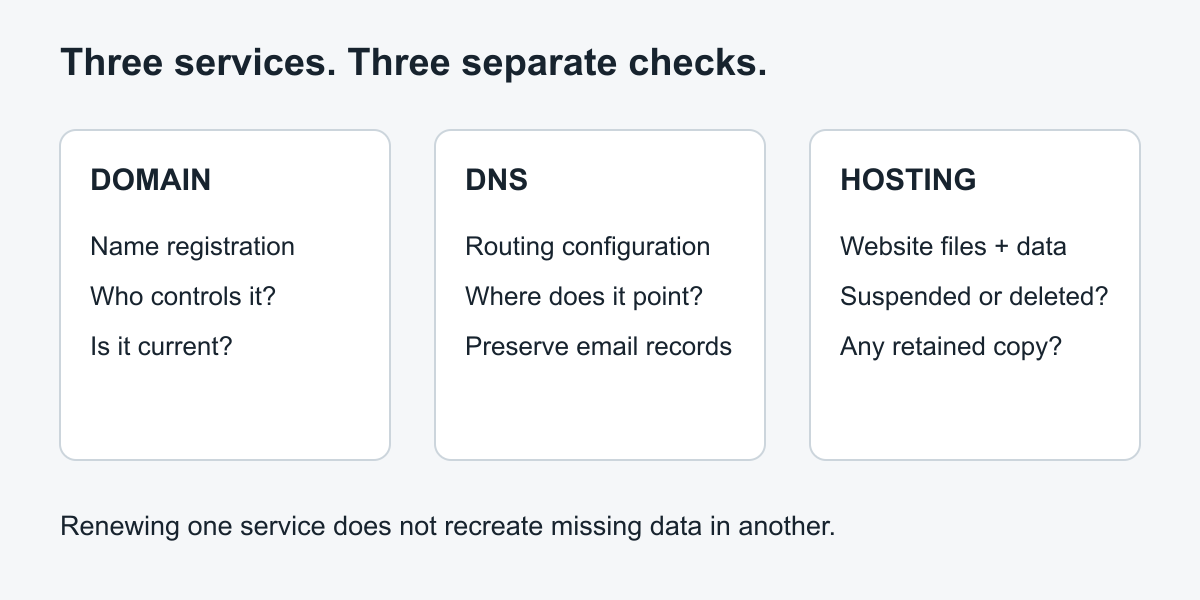
An original explanatory diagram. Renewing the name, correcting its routing and restoring website data solve different problems.
If you still control the domain, you may be able to use it with a recovered or reconstructed site. If control is uncertain, resolve it through the registrar's normal process; do not assume a hosting login proves domain ownership.
Ask the former host for a precise recovery answer
Contact support promptly through the provider's official account or support channel. Ask whether the service is suspended, scheduled for deletion, or already deleted. Retention depends on the provider, plan, account history and applicable policy. There is no universal number of days you can safely rely on.
Request the dates and contents of any available copies. “We have a backup” is not enough: it might contain only files, only a database, or an older version unrelated to the missing site. Ask whether support can preserve the available copy while you decide, what recovery access requires, and whether any recovery charge applies. Do not agree to a charge without understanding its scope.
For WordPress, ask specifically for both the website files and the associated database. The WordPress backup handbook identifies both as the normal requirements for full restoration. A download of the public web directory alone is not necessarily a complete CMS backup.
Copyable host-support request
Use this as a request template, not as an instruction to disclose credentials. Replace the descriptions with your own account details inside the host's secure support system.
Subject: Confirm recovery options for expired website hosting
My website hosting for the domain shown in this account stopped working on the date recorded in my support ticket. Please confirm whether the account is suspended or whether its data has been deleted.
Are any website-file and database backups still available? Please state their dates, what each contains, and whether a copy can be preserved while I assess recovery.
Can you provide an export or restore it to a private environment? Please explain any account-verification steps, recovery fees and limitations before proceeding.
Please also confirm whether email data is affected and whether any DNS changes are required. I do not authorize deletion of surviving data.
Keep the response and ticket reference. A written confirmation that no backup remains is useful evidence for choosing the next route, rather than repeatedly requesting the same renewal.
Build a recovery-source checklist while support investigates
Search places your team actually used: a previous developer's handover, local project folders, cloud backup storage, CMS exports and deployment packages. Preserve each original and inspect a working copy. Do not upload an unfamiliar archive directly into a public hosting account.
| Source to check | What to request or inspect | Decision it supports |
|---|---|---|
| Former hosting provider | Dated files, database export, account status and recovery terms | Restore an original installation if a suitable complete copy exists |
| Previous developer or agency | Final delivery package, source repository and deployment notes | Recover original work without reconstructing everything |
| Your own storage | Backup archives, uploads, content exports and purchase records | Identify usable pieces and their versions |
| Business content owners | Approved page copy, original photographs and downloadable documents | Replace missing public material with authorized originals |
| Public archive captures | Actual surviving pages and resource URLs | Rebuild public content when server data is unavailable |
For every candidate, record who supplied it, its date, the site it belongs to and whether you opened it successfully. A filename containing “backup” does not establish completeness. Keep private databases and customer information out of public enquiries and article comments.
If support confirms that the data was deleted, use the deleted-website source worksheet to assess the remaining evidence and select a recovery route.
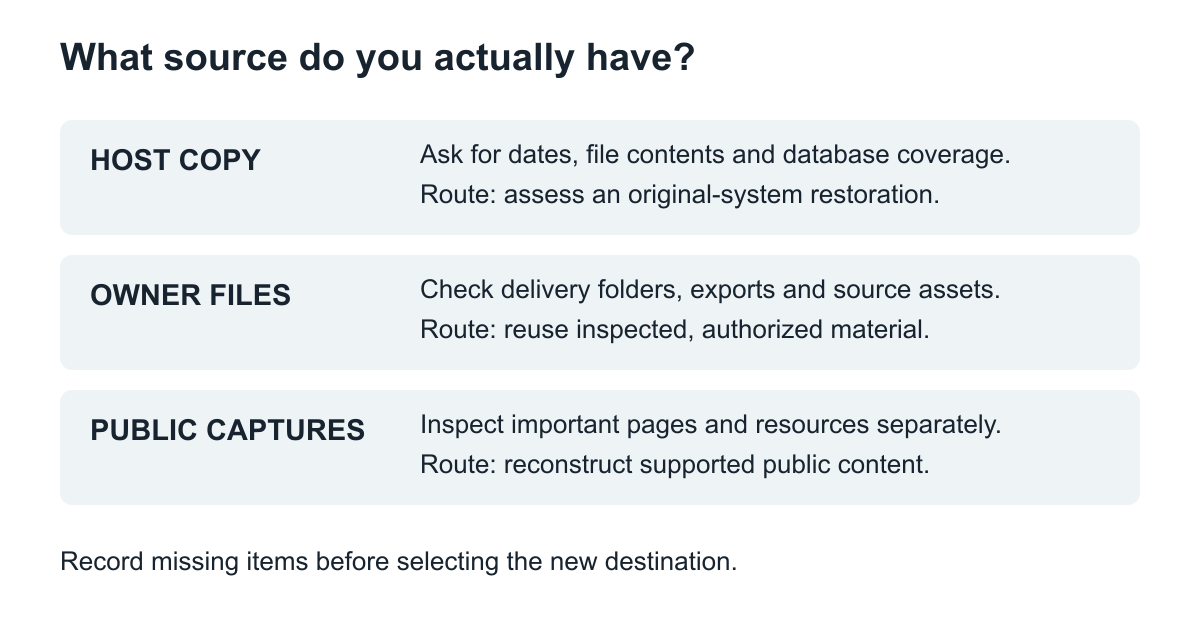
Original source-planning diagram. Sources complement one another; an archive capture is not a substitute for private application data.
Assess archived pages only after identifying the missing data
If hosting recovery is unavailable, enter the original domain and important page URLs in the Wayback Machine. Inspect the pages, images and downloads you need, not just the homepage. Record the capture links that contain useful content and the gaps you observe.
A public capture may help recover published text or a visual reference. It does not recover an uncaptured database, original passwords or private order records. A visible contact page still needs a current form implementation if the backend is gone.
Make an initial scope with three groups: essential pages with usable evidence, essential pages that need approved replacement material, and lower-priority pages that can wait. If the archive contains an obsolete business version, ask the owner which facts remain suitable for publication.
The end-to-end archive restoration guide explains how to turn those findings into a tested rebuild. At this stage, your hosting-loss decision is simpler: use a genuine retained backup when available, or prepare a reconstruction scope when it is not.
Prepare the new destination without confusing it with the source
Choose the target according to the recovered material and current editing needs. A complete original WordPress backup needs a compatible installation and a reviewed restore process. An archive-derived site needs newly built content structures and any separately agreed functions. Editable WordPress restoration is a reconstruction deliverable, not a claim that the archive preserved the original database.
Give the new host or developer the intended platform, domain-control status, source inventory, essential URL list and deployment responsibilities. Transfer required access later through an appropriate secure method. Do not put passwords in the initial project description.
Test the recovered site on its working destination before changing public routing. Check direct page addresses, image files, email-dependent functions and current business details. Keep the old account and originals intact until you understand what was delivered and what is still missing.
Will renewing hosting bring the site back?
It can restore access if the provider confirms that the account and data are still available. It cannot be assumed to recreate deleted files. Ask support to distinguish reactivating the subscription from restoring a specific dated backup.
What if the hosting company has closed?
Use any legitimate successor or support channel identified by the provider, then proceed with the sources you control. Do not make your entire recovery plan depend on an unconfirmed hidden copy. If the surviving material is incomplete, an archive review can help define which public pages support a realistic reconstruction.
The useful handover is a clear answer about available sources, a tested destination, and a fresh backup you can access independently of the new hosting subscription.