
Published by Wayback Downloader.
Restoring a lost WordPress website from the Wayback Machine normally means reconstructing its available public pages, posts and media in a new WordPress installation. It is not the same as restoring the original database. Check authorized backups and exports first, then map the surviving public evidence into agreed content types, editing tools and current functionality.
If you want an editable site instead of raw files, see our archive.org to WordPress service. You can also request a free archive review first.
The first decision is whether you have the original system or only evidence of what visitors saw. That distinction determines both the work and what can honestly be delivered.

Check for an original backup or export first
Ask the previous host and authorized administrators about database backups, website files, migration packages, WordPress exports and builder exports. Record what each candidate actually contains and which date it represents. Preserve originals and inspect copies in a separate environment before replacing any current website.
The WordPress backup handbook distinguishes the database from the files. A public HTML capture is neither a database dump nor proof that the original theme, plugins or users can be reinstalled.
| Source | What it may contribute | What must still be checked |
|---|---|---|
| Authorized database and file backup | Original-system data and files from its recorded date | Completeness, compatibility, security and correct restore environment |
| WordPress content export | Exported content and associated records included by that export | Actual fields, media availability and destination handling |
| Builder template export | Included layout structures and settings | Dependencies, version compatibility and supplied scope |
| Public archive capture | Visitor-facing content and available resource evidence | Missing pages, source dates, new implementation and current functionality |
These are possible contributions, not findings about your website. Do not label a backup usable until its actual contents and restoration path have been checked.
For missing accounts, transactions or application records, the public-capture versus private-database guide explains which authorized backup sources are needed and what a fresh reconstruction cannot recover.
Recover public content with a traceable inventory
Identify the required original URLs and suitable captures. Include individual articles and service pages, not only the homepage. Record the full capture reference, observed timestamp, recovered text, available media and unresolved elements for each item. For a limited editorial loss, the individual WordPress post-recovery inventory keeps body evidence, dates and attribution separate.
Use the snapshot-selection scorecard to keep different business versions separate. A captured menu or article listing can reveal useful addresses, but does not establish that every linked body was saved.
Preserve headings, lists, captions and attribution where evidenced. Review old business details with the owner. Missing copy supplied now is new writing, not recovered text; keep that distinction in the handover.
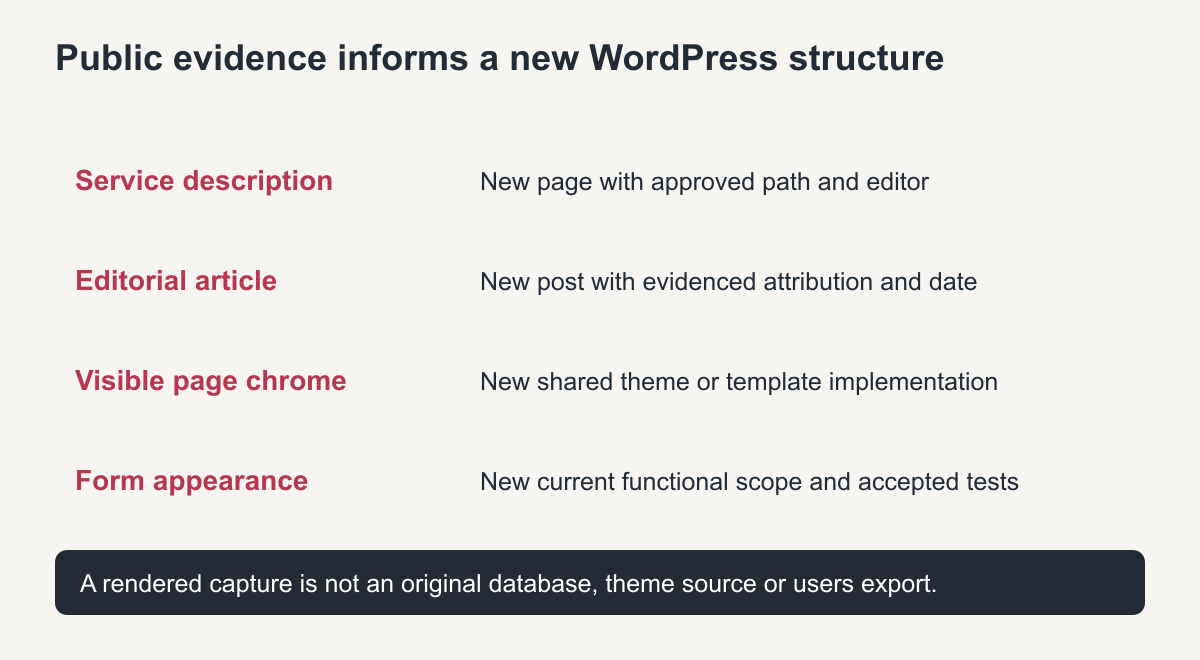
Original reconstruction map. It does not imply recovery of an original database.
Decide the content type before recreating the page
A service page and a dated article can look similar in a browser but serve different roles in WordPress. Plan the destination's content model, navigation and archive behavior before importing everything as the same type.
The WordPress post-type handbook describes content types as application structures. Choose structures for the intended publishing workflow; the historical page's appearance does not by itself identify its original database record.
| Public evidence item | Suggested new structure | Decision to document |
|---|---|---|
| A service description | Page | Approved path and editing requirements |
| A dated editorial article | Post | Evidenced date, attribution and useful category |
| A logo or article photograph | Media item | Actual source, permitted use and image role |
| Repeated header or footer | Shared theme/template structure | Where it is edited and which pages it affects |
| A public enquiry form | New current implementation | Recipients, validation, delivery and accepted tests |
| Historical account or checkout interface | Separately scoped application work | Which current data and integrations the owner must supply |
This map is a planning example, not a universal import rule. Pages can become posts or vice versa when the owner approves the new organization and its URL consequences are handled deliberately.
Specify the delivered editing model
Name the actual editor and what it controls. Native WordPress blocks can provide separate editable headings, paragraphs, images and lists. A code-managed template or embedded HTML section has different limitations. WordPress alone does not guarantee that a business owner can rearrange every visual section. The HTML-to-editable-content guide explains component mapping, while the WordPress-versus-Elementor comparison helps specify actual maintenance tasks.
If native Elementor layout editing is required, include it explicitly in the scope. Do not describe a screenshot inserted as an image, or a whole page inside an HTML widget, as a native visual reconstruction.
Use a representative page to define acceptance: the owner can change its heading, replace its content image and save the change through the agreed editor without editing source code. Separately test any promised layout changes. This is a proposed acceptance test, not a claim that your project has passed it.
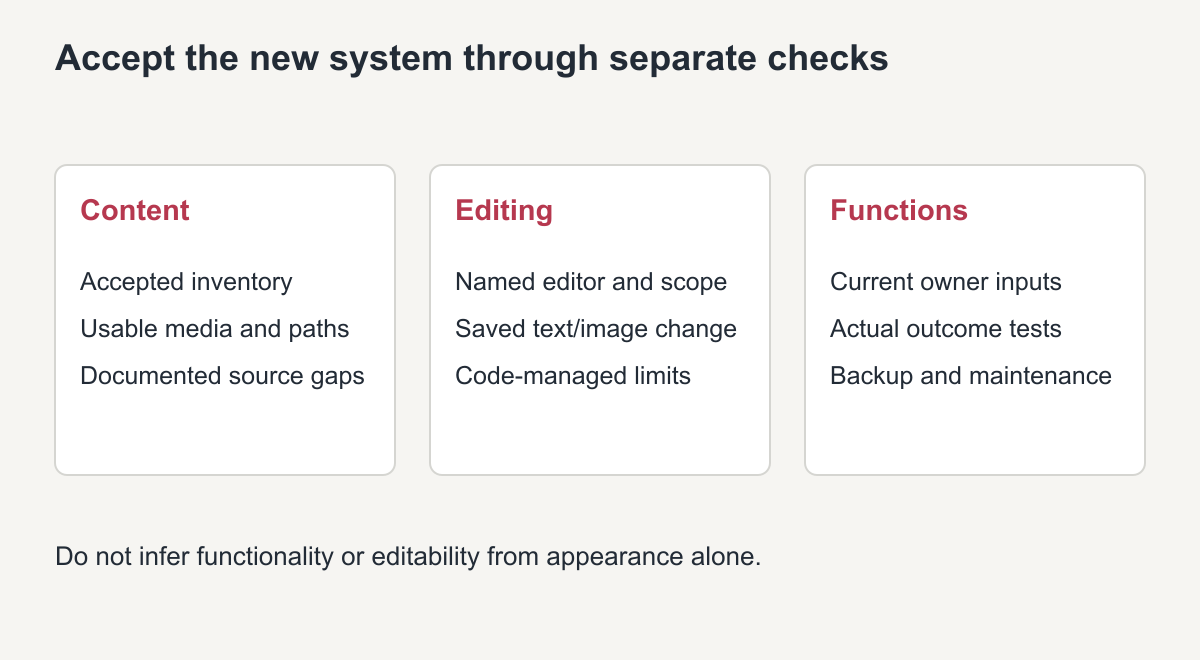
Original handover guide. Editing claims must match the implemented structures.
Rebuild navigation and current functions deliberately
Map original addresses to their intended destinations and repair contextual links. Where preserving a useful path is practical and approved, test it directly as well as through menus. If a path changes, record the old-to-new mapping and the agreed handling instead of silently flattening the site.
Configure forms, analytics and other functions from current authorized inputs. Public captures do not establish private notification recipients, account records, historical orders or plugin settings. Do not reuse old identifiers merely because they remain visible in markup.
Test the functionality actually included. A contact page that looks correct has not demonstrated that an enquiry reaches the intended recipient. Record unresolved inputs and exclusions before acceptance.
Complete a useful WordPress handover
Reconcile delivered pages and posts with the agreed inventory. Check readable content, media loading, important direct URLs, contextual links and the owner's representative editing task on desktop and mobile. Distinguish implementation defects from source gaps that were explicitly accepted.
Provide the destination's backup arrangement, editing notes and maintenance responsibilities. The new site's files and required database should be backed up as a new system; the archive remains source evidence, not its operating backup.
For WordPress website restoration, ask for the content inventory, named editor, missing-item record and tested scope. Original users, private drafts and plugin configuration return only when suitable authorized source data exists—not because the public pages have been reconstructed.
Restore WordPress from Wayback Machine: quick checklist
- Install a fresh WordPress and a suitable theme.
- Match the old permalink structure.
- Recreate posts and pages from the snapshots.
- Upload recovered images and reconnect them.
- Rebuild menus, forms and widgets.
- Test every old URL before launch.
Frequently asked questions
Can I restore WordPress from Wayback Machine with the original theme?
Only if the theme is still available. Otherwise a modern theme is styled to match the archived design.
Are plugins restored too?
No. Plugins run on the server and are not archived. Install current versions that provide the same functions.
Can posts keep their original dates?
Yes, if the dates are visible in the archive or known from your records.